
零刻eq pro上winpve双
29 May 2023
零刻EQ Pro上Win+PVE双系统安装
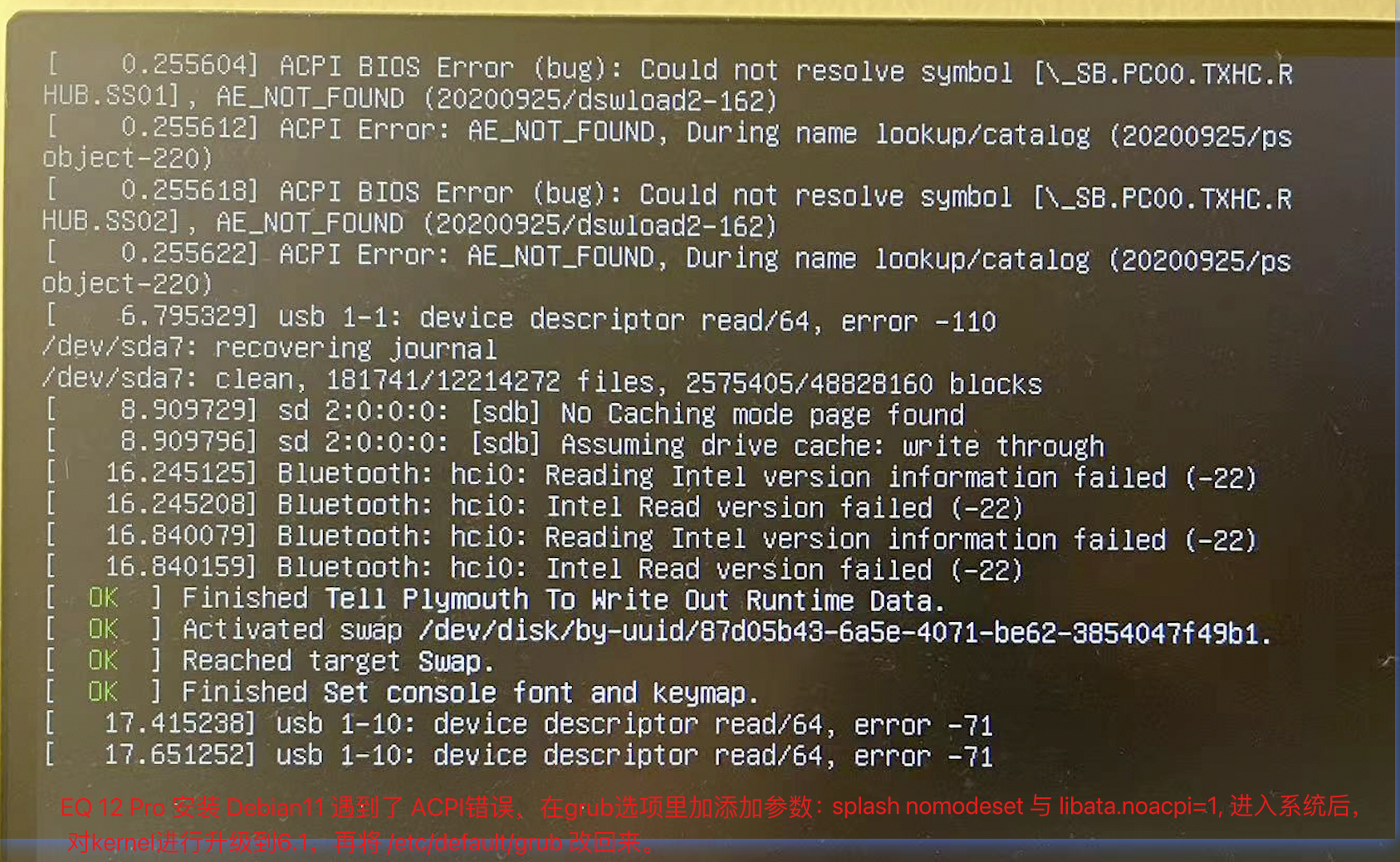
解决debian黑屏无法启动问题 Debian 11 新装系统开机黑屏 [ACPI BIOS ERROR (BUG): Could not resolve symbol _SB.PCIO.SATO.PRTO
编辑/etc/default/grub添加参数splash nomodeset 与 libata.noacpi=1:
GRUB_CMDLINE_LINUX_DEFAULT="quiet splash nomodeset libata.noacpi=1"

# 执行下列命令使修改生效
export PATH=$PATH:/usr/sbin
update-grub
重启ok后,/etc/hosts的pve主机名改成静态ip, 并更新pve-kernel,如下:
# 编辑 nano /etc/apt/sources.list
# 加#号注释 debian GNU/...

# 添加 pve source
echo "deb [arch=amd64] https://mirrors.tuna.tsinghua.edu.cn/proxmox/debian bullseye pve-no-subscription" > /etc/apt/sources.list.d/pve-install-repo.list

wget https://enterprise.proxmox.com/debian/proxmox-release-bullseye.gpg -O /etc/apt/trusted.gpg.d/proxmox-release-bullseye.gpg
# 更新软件源
apt update && apt full-upgrade
# 安装 apt install pve-kernel-6.1 -y
apt install pve-kernel-6.1 -y

# kernel更新到pve-kernel-6.1后,记得要把`/etc/default/grub`改回来,去掉参数 `splash nomodeset` 与 `libata.noacpi=1`.

# 重启 reboot后,安装pve软件包
apt install proxmox-ve postfix open-iscsi
记得在pve的web管理后台配置网络,如果配置失败可以直接编辑 /etc/network/interfaces添加一个桥接网络:
# ....
auto vmbr0
iface vmbr0 inet static
        address 192.168.11.166/24
        gateway 192.168.11.1
        bridge-ports enp1s0
        bridge-stp off
        bridge-fd 0
    .......
参考: 实战PVE:N5095 Win+PVE双系统安装 Debian 桌面环境选择 在 Debian 11 Bullseye 上安装 Proxmox VE PVE官方文档-网络配置
** pve 7.x hosts 配置 vim /etc/hosts**
127.0.0.1	localhost
# 127.0.1.1	pve-eq.wodedata.com	pve-eq
192.168.11.166	pve-eq.wodedata.com	pve-eq

# The following lines are desirable for IPv6 capable hosts
::1     localhost ip6-localhost ip6-loopback
ff02::1 ip6-allnodes
ff02::2 ip6-allrouters
pve 7.x grub配置
➜  ~ cat /etc/default/grub
# If you change this file, run 'update-grub' afterwards to update
# /boot/grub/grub.cfg.
# For full documentation of the options in this file, see:
#   info -f grub -n 'Simple configuration'

GRUB_DEFAULT=0
GRUB_TIMEOUT=5
GRUB_DISTRIBUTOR=`lsb_release -i -s 2> /dev/null || echo Debian`
GRUB_CMDLINE_LINUX_DEFAULT="quiet splash"
GRUB_CMDLINE_LINUX=""

# Uncomment to enable BadRAM filtering, modify to suit your needs
# This works with Linux (no patch required) and with any kernel that obtains
# the memory map information from GRUB (GNU Mach, kernel of FreeBSD ...)
#GRUB_BADRAM="0x01234567,0xfefefefe,0x89abcdef,0xefefefef"

# Uncomment to disable graphical terminal (grub-pc only)
#GRUB_TERMINAL=console

# The resolution used on graphical terminal
# note that you can use only modes which your graphic card supports via VBE
# you can see them in real GRUB with the command `vbeinfo'
#GRUB_GFXMODE=640x480

# Uncomment if you don't want GRUB to pass "root=UUID=xxx" parameter to Linux
#GRUB_DISABLE_LINUX_UUID=true

# Uncomment to disable generation of recovery mode menu entries
#GRUB_DISABLE_RECOVERY="true"

# Uncomment to get a beep at grub start
#GRUB_INIT_TUNE="480 440 1"